

HCM Software Guide: How to Evaluate & Select an HCM Solution
Choosing HCM software can feel like a big decision, and it is. The right platform can help you simplify HR, pay, time, talent, planning, and analytics while making work life better for your entire organization. Our HCM buyer’s guide includes what HCM software is, what to look for in a provider, and how to evaluate your options with more clarity and confidence.
How a single HCM platform can transform your workplace
For HR, payroll, finance, IT, and operations leaders, an HCM solution can do more than replace disconnected tools and reduce manual work. It can help create a stronger foundation for workforce decisions across the business. When data lives on a single HCM platform, teams improve reporting confidence and gain clearer insight into how workforce choices affect costs, compliance, and performance.
Use our HCM guide to build a selection committee, determine your non-negotiables, and choose the solution that’s right for your business.
Chapter 1: HCM benefits and business case for ROI
Key takeaways
- Managing labor through disconnected systems limits the visibility leaders need to control costs and risks.
- When workforce data lives on a single platform, leaders can make decisions with clearer context instead of relying on a patchwork of reports.
- An effective HCM solution delivers benefits beyond administrative efficiency, connecting workforce strategy to measurable business decisions and impact.
- Fewer preventable errors and a stronger grip on how workforce choices influence financial performance are two prominent HCM benefits.
Labor is often an organization’s largest and most significant investment. Yet it doesn’t always receive the same level of visibility and discipline as other major expenses.
In too many companies, hiring, time tracking, payroll, and workforce planning and analytics operate in separate systems. This creates a disconnect that makes it harder for leaders to see what’s really driving labor costs or where their greatest workforce risks lie.
Investing in the right human capital management (HCM) software can help close this critical gap.
The benefits of human capital management emerge when everything runs on a single AI-powered people platform and data model, giving leaders a clear and reliable picture of their workforce and its financial impact. It replaces guesswork with the insight and clarity leaders need to manage their largest expense with confidence. Learn more about HCM benefits and the business case for ROI.
Chapter 2: HCM vs. HRIS vs. HRMS: Key differences
Key takeaways
- An HCM system, HRIS, and HRMS overlap in some capabilities, but they are distinct tools.
- A human resource information system (HRIS) is the most basic HR software solution, focused primarily on storing and managing employee data.
- An HCM platform builds on human resource management system (HRMS) capabilities with broader functionality, including advanced reporting capabilities and tools that help support strategic workforce decisions.
- The right HR software for your organization will depend on your company’s size, budget, and goals.
- Your organization may need HCM software if it has outgrown its existing HR tech stack and needs a more comprehensive platform to support HR as a strategic function.
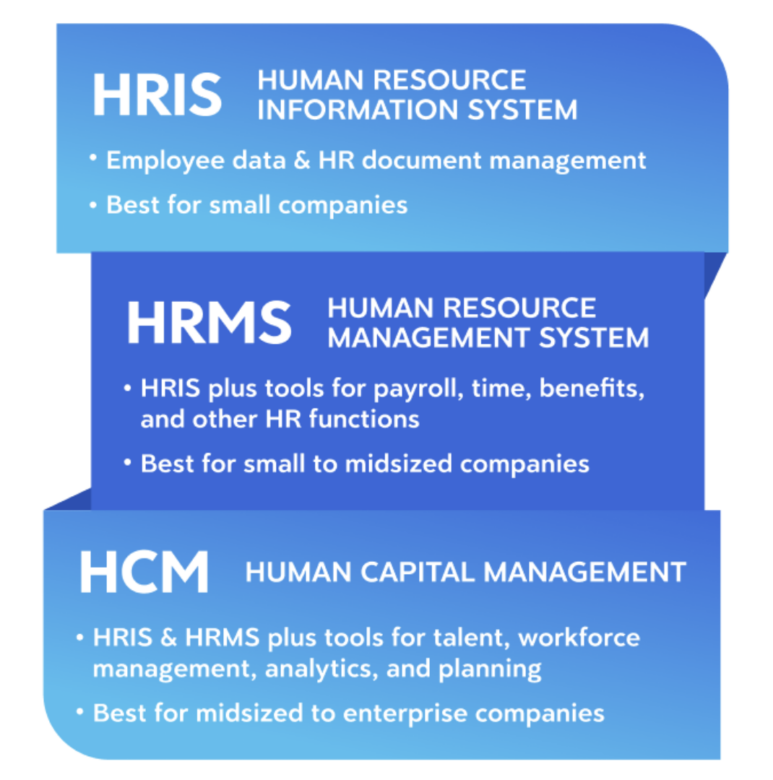
What is an HRIS?
An HRIS helps organizations move beyond spreadsheets or disconnected records by creating a central place for employee data. In most cases, the system:
- Shows team member information in one place
- Provides core HR functionality, such as organizational chart maintenance, document management, and basic reporting
The difference between an HRIS and an HCM system really comes down to scope. An HRIS stores and manages employee data, whereas an HCM system is a comprehensive solution that can grow with your organization. If your business is small with relatively straightforward HR needs, an HRIS may be enough. But as workforce complexity grows, many organizations turn to software with broader capabilities.
What is an HRMS?
An HRMS expands on the core recordkeeping functions of an HRIS. An HRMS typically has modules for different HR functions, including:
- Recruiting
- Benefits administration
- Time and attendance
- Payroll
- Training
- Performance management
An HRMS also facilitates employee self-service, allowing employees to update personal information, view pay details, or request time off through the system. Plus, it offers more advanced reporting than an HRIS, giving leaders better visibility into workforce activity and HR operations.
Implementing an HRMS may be the right move if you need more than a system of record but are not yet looking for the broader capabilities of an HCM platform. But if you have (or plan to have) a global workforce or have more advanced analytics needs, evaluating HCM software might be the right call.
What is HCM software?
HCM software is a comprehensive suite of HR tools that supports the entire employee lifecycle. It generally includes the functionality of an HRIS and an HRMS, while extending into areas such as:
- Talent management and workforce planning
- Analytics and reporting
- Automation, AI-powered assistants, and AI tools
- Global capabilities to support more complex workforces
HCM software is built to help organizations act on workforce data. Rather than relying on separate systems and manual workarounds, leaders have what they need to manage workforce complexity and make more informed decisions across HR, finance, IT, and operations. And because most HCM platforms are built to scale, the solution can grow alongside your organization’s needs. Learn more about HCM vs. HRIS vs. HRMS.
Chapter 3: Hidden costs of fragmented HR systems: When to consolidate
Key takeaways
- HR systems often get fragmented over time as new tools are added to solve specific problems.
- When these systems don’t effectively share data, manual work tends to increase while confidence in reporting decreases.
- Hidden costs tend to show up as operational drag that teams learn to gradually accept as normal.
- Organizations often recognize they’ve outgrown patchwork systems when payroll cycles slow or reporting requires a lot of manual cleanup. You might also notice integrations beginning to break.
- Consolidating HR tools into a single HCM platform can help create a more stable foundation for workforce data.
Challenges of multiple HR systems
System fragmentation within your human resources department may not be obvious at first glance. Each HR system may be working just fine on its own.
But what happens when information from one system is needed in another tool? Does this data automatically transfer, or does someone have to copy it over manually? That’s where problems often begin.
Employee records might live in one application, payroll in another, and workforce scheduling in a different tool. And that can result in a constant need to reconcile records and confirm which version of data is correct.
Unfortunately, HR teams regularly deal with these issues.
A 2025 survey by HR.com found that nearly 80% of organizations use between two and seven paid HR solutions from different vendors, while fewer than 40% said those tools integrate well or extremely well.
The hidden cost of HR software lies in these gaps. HR teams spend time validating data, finance leaders question reporting accuracy, and IT teams continually patch systems that weren’t designed to work together.
Fragmentation can also limit how effectively organizations adopt AI. AI-powered tools depend on clean, connected, and trustworthy workforce data to surface useful insights, automate routine work, and support faster decision-making. When data is scattered across systems or must be manually reconciled, teams may struggle to get dependable outputs from AI-enabled capabilities.
Hidden costs of HR software fragmentation
The operational friction created by fragmented systems often comes to light in measurable ways. Continuous reconciliation work, reporting delays, compliance exposure, and the growing need for IT patches all carry real-world costs.
As they often develop gradually, it’s easy to overlook these issues. But left unchecked, they build until they become undeniable. Let’s take a closer look at where the effects tend to show up and grow over time.
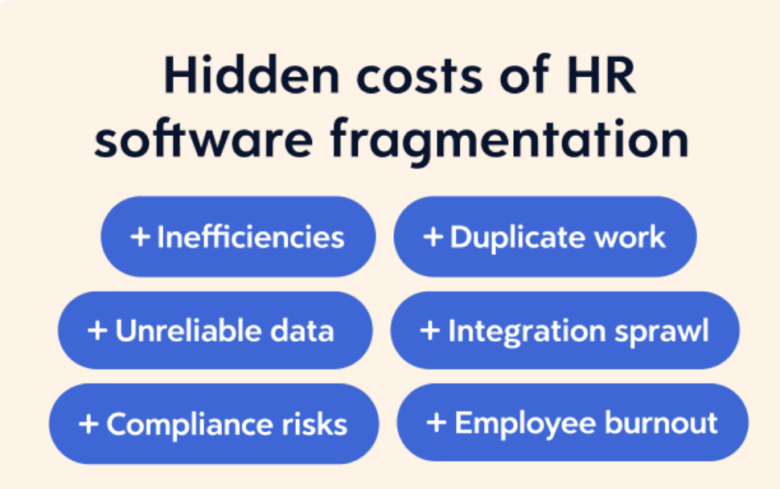
Inefficiencies and duplicate work
When employee data lives across different platforms, you run the risk of manual reconciliation becoming routine. And that has a price.
It takes valuable time for HR staff to enter information multiple times or check records across systems to confirm accuracy. When data doesn’t sync as expected, payroll teams often end up reviewing reports manually before processing. That can slow pay cycles and make errors more likely.
Payroll and wage errors can carry real financial consequences. In fiscal year 2025, the U.S. Department of Labor recovered more than $259 million in back wages for nearly 176,957 employees.
Compliance risk
Compliance challenges can grow when policy rules and employee records sit in separate systems. Benefits eligibility, for example, might be applied inconsistently if data doesn’t automatically update across platforms.
It can also prove problematic if payroll adjustments rely on outdated information. Even small discrepancies can compound across pay cycles or reporting periods, until they draw regulatory scrutiny.
Organizations pay for compliance and regulatory issues through fines and penalties that can range from hundreds to thousands of dollars per instance.
Decision delay
Good decisions need reliable data, and fragmented systems can make that harder to come by. When workforce data must be manually pulled and consolidated from multiple reports before leaders can act, speed and confidence can suffer.
Patchwork environments can also encourage “shadow tech,” where teams turn to spreadsheets or other workarounds because official systems feel difficult to use or unreliable. These unofficial processes may solve an immediate problem, but they can create new risks when critical workforce data sits outside governed systems.
Findings from HR.com’s survey showed that well under half of respondents said their HR technology produces analytics that are actionable (33%) and accurate (42%). Most blamed poor system integration, with 81% saying it limited their ability to meet HR goals. Learn more about the hidden costs of fragmented HR systems.
Chapter 4: HCM system selection: How to choose the right platform for your organization
ations. That way, you can move forward with confidence.
Key takeaways
- HCM system selection is a multi-step process that requires many stakeholders to get (and stay) on the same page.
- Your selection team should convert current HR-related pain points into a list of criteria your new HCM system must meet.
- Take control of product demonstrations early to make sure they address your specific needs rather than turning into generic marketing presentations.
- Watch for potential red flags and ask for real proof of value before committing.
Align stakeholders
Choosing the right HCM platform for global workforce administration starts with assembling a cross-functional team of key stakeholders. The HCM system will impact your entire organization, so input from various functional leaders is essential.
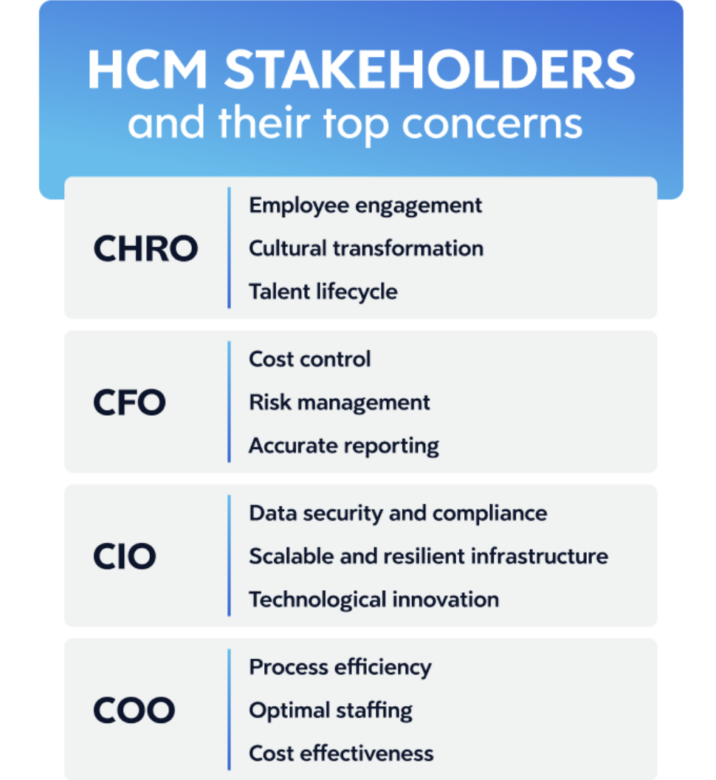
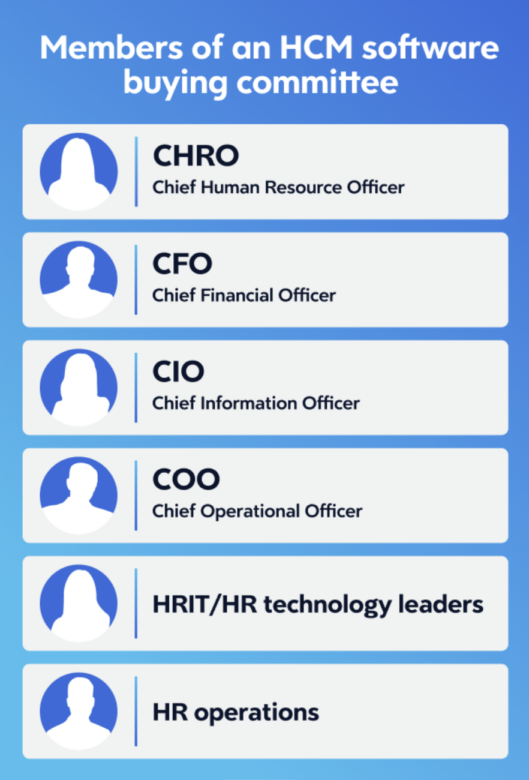
Your exact team roster may vary in size and composition, but these stakeholders should be involved:
- Chief Human Resource Officer (CHRO)
- Chief Financial Officer (CFO)
- Chief Information Officer (CIO)
- Chief Operations Officer (COO)
CHRO
Top concern
- Employee engagement
- Cultural transformation
- Talent lifecycle
CFO
Top concern
- Cost control
- Risk management
- Accurate reporting
CIO
Top concern
- Data security and compliance
- Scalable and resilient infrastructure
- Technological innovation
COO
Top concern
- Process efficiency
- Optimal staffing
- Cost effectiveness
Learn more about the HCM system selection.
Chapter 5: HCM features checklist for HR, payroll, and finance leaders
Key takeaways
- Start with outcomes, not lists of features. A well-structured HCM requirement checklist keeps the focus on capabilities that support payroll reliability, workforce insight, and decision-making.
- Platforms built on a single data model help cut down on reconciliation work and give leaders greater confidence in reporting.
- Different stakeholders have different priorities. Bringing HR, payroll, finance, and IT together early helps you compile a more complete set of requirements.
- Workforce complexity shapes the final decision. Growth plans and staffing models often determine which HCM features will deliver the most long-term value.
Before you start: What problem are you solving with an HCM suite?
Before comparing HCM features, step back and define the problems you’re trying to solve.
Do you want cleaner workforce data with detailed reporting and real-time access? More reliable payroll? Better visibility into labor costs? Answering these questions early makes it easier to identify which HCM features are most critical for your organization.
Starting with a clear sense of purpose puts you in the mindset to separate must-have requirements from flashy capabilities that aren’t relevant to your organization’s needs.
HCM requirements checklist
Before we dig into non-negotiable HCM features, it helps to grasp the broader capabilities leaders typically evaluate when selecting a platform. Organizing these as a checklist keeps the process focused on outcomes rather than vendor feature counts.
Here are some common HCM requirements to consider as you evaluate solutions:
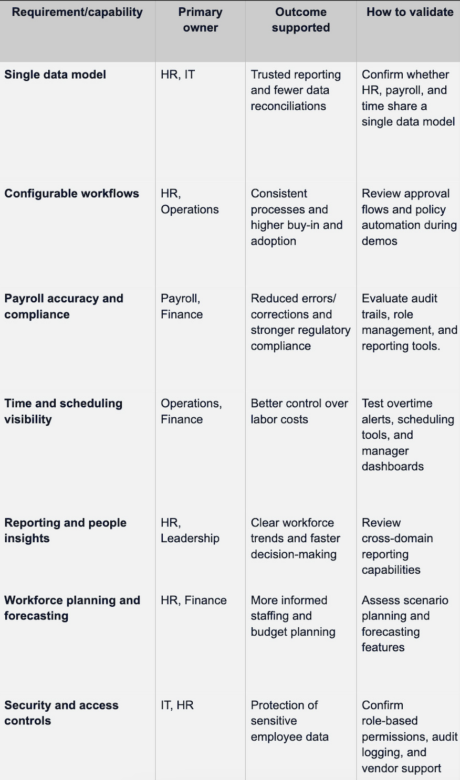
Read more about HCM features checklist for HR, payroll, and finance leaders.
Chapter 6: AI within HCM systems: Value, governance, and risks
Key takeaways
- AI in HCM can speed up decision-making, automate routine work, and generate insights — but only when built on a strong platform foundation.
- AI effectiveness depends on a single HCM platform and data model — fragmented systems limit accuracy, scalability, and trust.
- Responsible AI adoption requires strong governance, including transparency, bias monitoring, explainability, and ongoing model quality management.
- Organizations must ensure AI-assisted decisions are accountable, traceable, and auditable.
- Organizations must ensure AI can be configured and controlled by region, role, and use case to meet evolving regulatory requirements.
Creating value with AI-powered HR solutions
AI drives adoption in HR when it reduces manual work and supports better decisions — freeing teams to focus on higher-value, human-centered work. It can help organizations:
- Enable self-service in the flow of work, helping employees find answers quickly while reducing HR support needs.
- Automate routine and repetitive tasks to free up more time for higher-value work
- Forecast future hiring needs and proactively flag turnover risk before issues escalate.
- Support better, real-time decisions by delivering insights and recommendations directly in the flow of work.
AI delivers the most value when the stakes are clear. For high-volume workflows, it can automate rule-based steps and recommend next steps using patterns in workforce data. This is a strong fit for tasks like directing HR cases to the right team or surfacing relevant policy information.
For higher-stakes scenarios, such as hiring or compensation, AI should support — not replace — human decision-making. The system provides insights or recommendations, while humans review and approve final decisions.
AI built into an HCM platform designed around a single data model helps improve performance across HR, from day-to-day execution to long-term workforce planning. Its benefits include:
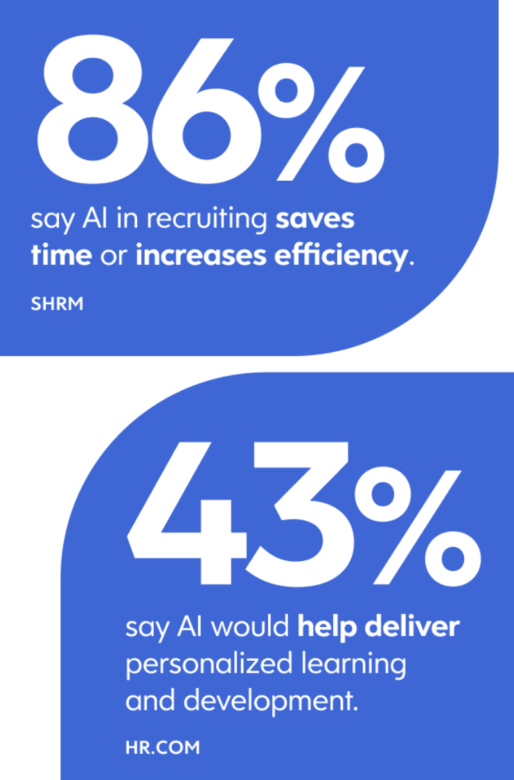
- Efficiency and productivity: The Society for Human Resource Management (SHRM) found that 89% of HR professionals whose organizations use AI in recruiting say it saves time or increases efficiency.
- Employee experience: In HR.com’s 2025 HR Technology and Integrations research, 57% of respondents said more AI would improve employee self-service, and 43% said it would lead to better personalized learning and development.
- Forecasting and strategic planning abilities: Deloitte notes that AI is already transforming workforce planning by improving demand-and-supply forecasting and helping leaders simulate workforce changes in response to disruption. Learn more about AI within HCM systems.
Chapter 7: HCM compliance: How to evaluate risk and controls
Key takeaways
- When evaluating HCM solutions with compliance features, leaders should focus on how policies are enforced and how system activity is documented.
- Effective platforms help support compliance through clear governance controls, flexible configurations to help manage changing policies and requirements, and reliable audit records.
- Having a single system for workforce management and pay enables consistent application of your compliance rules when compared to bolted together solutions.
- Buying committees should test compliance capabilities under real conditions, including across locations and different worker classifications.
- Clear data governance during implementation helps keep compliance controls consistent as an organization grows.
What is HCM compliance?
HCM compliance means meeting the legal and regulatory requirements tied to managing your workforce. Wage and hour rules, payroll tax reporting, employee classifications, and the protection of sensitive workforce data can all fall under this umbrella. On top of national requirements, many organizations also face regional and industry-specific rules that can touch nearly every part of workforce management.
That’s a lot for HR, payroll, and frontline managers to handle. Fortunately, modern HCM platforms help manage that load through built-in controls and oversight.
HCM security features, for example, can help organizations protect employee data and manage system access while maintaining records that support potential audits. When those safeguards come standard in the system, managing compliance can be part of normal operations rather than a separate effort.
HCM compliance features to consider
When you evaluate an HCM platform, its ability to support compliance standards depends on controls built throughout the system. It’s less about a single feature and more about how well the platform adapts to changing workforce policies and regulatory requirements.
Considered together, the following compliance-focused features in HCM software can help organizations document policy enforcement and maintain audit-ready records.
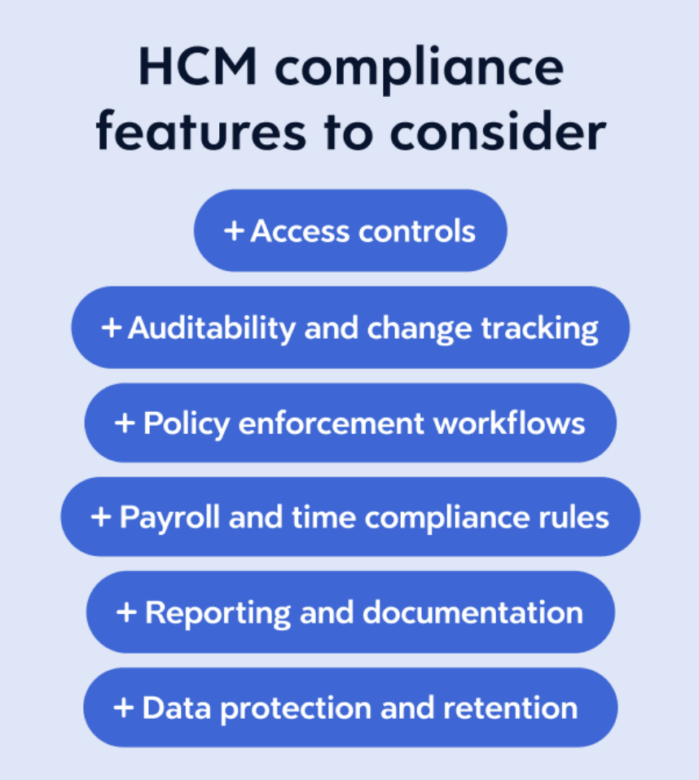
Access controls and separation of duties
A strong compliance foundation starts with setting clear boundaries around who can access or modify workforce data.
Role-based access controls limit visibility based on job responsibilities, and administrative permissions help prevent unauthorized changes to payroll and employee records. Organizations also often rely on approval layers that separate those who enter data from those who authorize it. Learn more about HCM compliance.
Chapter 8: How to implement an HCM system successfully
Key takeaways
- HCM implementation is the process of configuring and rolling out your new software within your company.
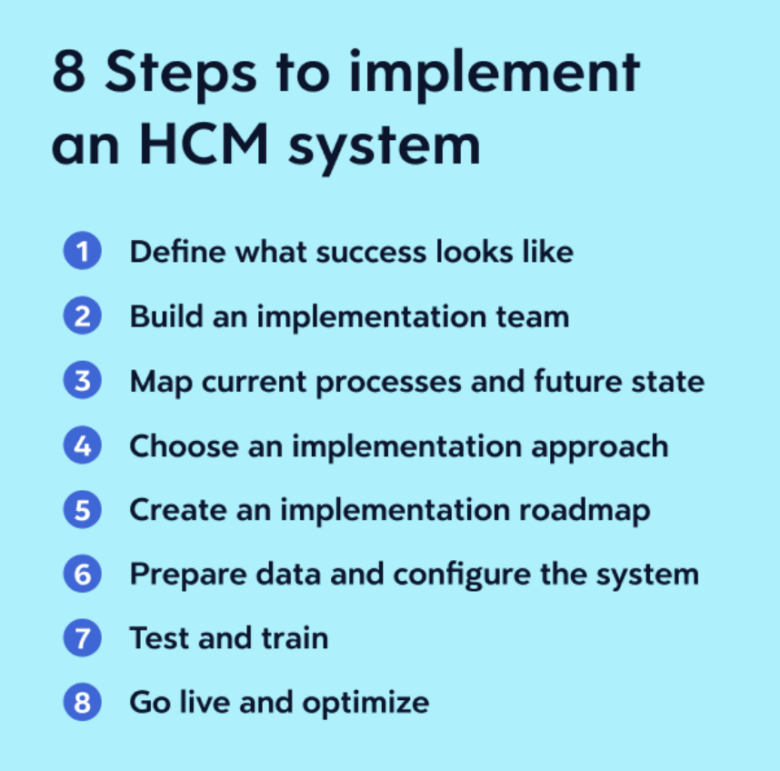
- The implementation process starts with defining what “done” or “go live” looks like and selecting an implementation team to lead the initiative. This may include stakeholders from your company, software provider, or both.
- Choose an implementation approach and schedule that fits your organizational needs, budget, and resources available. This might be a phased rollout or full deployment.
- Identify what data needs to migrate and where it lives, then clean it up before it moves.
- Communicate your HCM implementation plan clearly, test extensively, refine the system, and train all users.
What is HCM implementation?
HCM software implementation is the process of configuring your new platform and rolling it out to your end users.
When it goes well, the results are tangible. Teams can adopt the system faster, reporting can get more reliable, and HR operations can run with less manual effort and fewer errors. Then the investment starts paying off.
When it goes poorly, the problems can turn up quickly and tend to compound. Payroll errors due to incorrectly implementing payroll processes and procedures might require costly fixes. Compliance gaps could emerge from misconfigured rules. Decisions might be backed by data nobody fully trusts. And teams that never properly adopt the system find workarounds that are hard to undo.
Steps to implement an HCM system
A methodical rollout is the best defense against the problems outlined above. Here are the steps that form the basis for your implementation timeline and transition plan:
Read more about how to implement an HCM system successfully.
Chapter 9: Who is involved in selecting HCM software?
Key takeaways
- An HCM buying committee should include stakeholders from HR, finance, IT, and operations, as each group owns a different outcome that the system affects.
- Clear roles and governance keep the selection process moving forward without confusion about who evaluates and who approves the final decision.
- Early agreement on priorities, including “must-haves” and “nice-to-haves,” helps the team focus on business outcomes rather than feature lists.
- Strong cross-functional collaboration can make it easier to build a business case and get approval for a new HCM platform.
- Effective committees treat HCM software as shared infrastructure and evaluate platforms based on long-term fit.
Building an HCM buying committee
An HCM buying committee is made up of stakeholders from departments most affected by the new software. Their job is to select the platform that best serves each team’s needs and the organization’s direction over time.
The reason a committee makes sense is that single-system HCM platforms extend across an organization’s people and departments. That includes payroll, recruiting, operations, data analytics, and even employee onboarding and development.
Strong stakeholder alignment when making an HCM selection helps these teams move forward with a shared understanding of what matters most for each discipline.
An HCM buying committee will typically define requirements, evaluate vendors, weigh functional needs, and build consensus around a new system. Without that alignment, decisions can stall or shift late in the process.
Core HCM decision-makers and what matters to each
Each stakeholder on the committee is responsible for different outcomes. These stakeholders across HR, payroll, IT, and finance bring distinct perspectives and priorities that shape the final decision.
Read more about who is involved in selecting HCM software.
Chapter 10: From decision to deployment: HCM platform timeline and transition plan
Key takeaways
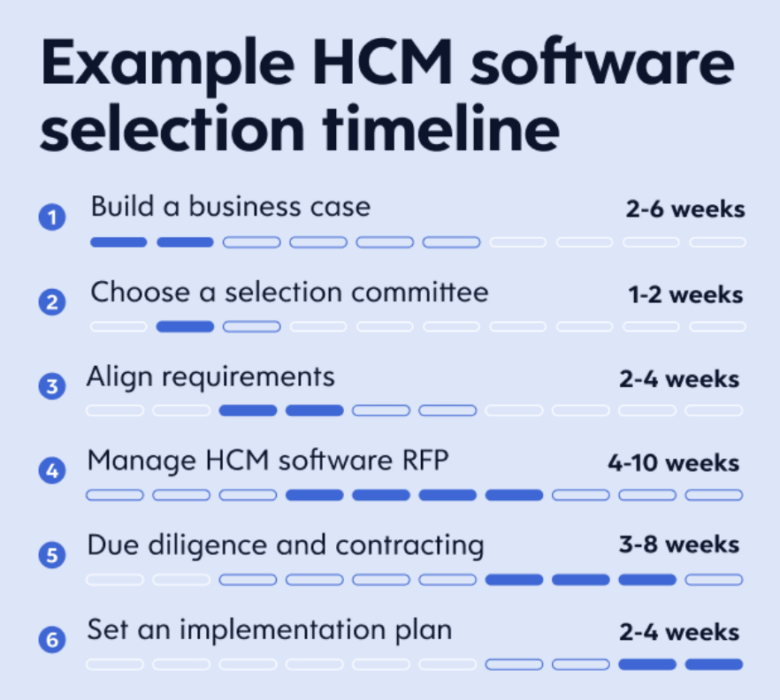
- Your HCM selection timeline could take up to eight months, depending on company size, goals, and other variables.
- Start the process by building a business case for the new platform and getting selection committee members aligned on HCM platform requirements.
- Cast a wide net early, requesting proposals from multiple vendors offering plausible solutions.
- Book product demonstrations and complete due diligence for your top picks before negotiating a contract.
The end-to-end HCM selection timeline
Before a single vendor conversation happens, there’s a lot of work to do. The first several weeks (sometimes closer to two months) involve internal groundwork that sets the foundation for everything that follows.
Building a business case
The first phase of your HCM project plan is all about building a business case that resonates beyond HR. Over the next two to six weeks, you’ll spell out exactly why you need a new platform by combing through existing processes and identifying pain points.
For instance, your current processes and tech stack may:
- Be inefficient, requiring repeated manual effort
- Lead to frustrating and disruptive outcomes, like payroll errors or long time-to-fill periods
- Generate poor-quality reports that hinder effective decision-making
As you work through this exercise, think about what problems the new system needs to solve and what measurable outcomes it should produce. Learn more about the HCM platform timeline and transition plan.
Related:
Like MediaFeed’s content? Be sure to follow us.
This article originally appeared on Dayforce.com and was syndicated by MediaFeed.co.